

Your AI becomes
a developer.
Your quota
lasts longer.
Delta MCP is a free app that sits between your AI and its MCP servers: one program per task instead of one tool call per step.
Between your AI and its MCP servers: one program per task, not one tool call per step.
3.3–24.1× fewer tokens, measured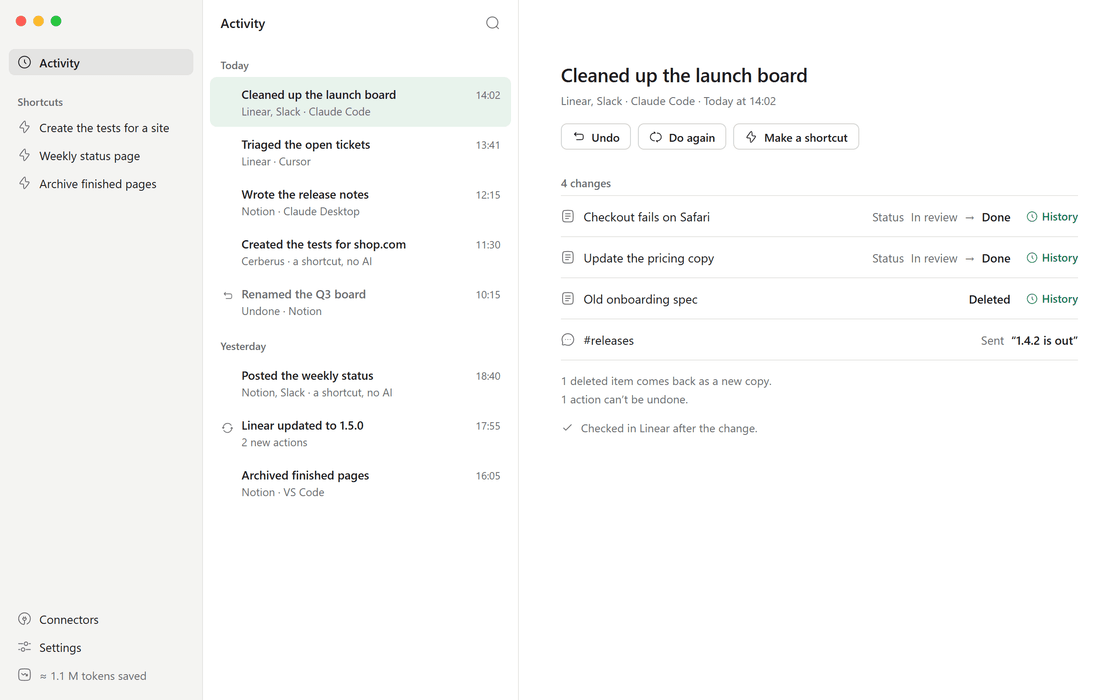
Works with 12 AI apps, including
- Claude Desktop
- Claude Code
- Cursor
- VS Code
- Windsurf
- Gemini CLI
- Cline
- LM Studio
- and 4 more
- and 7 more
The difference
Same result, a fraction of the work
Your AI stops calling tools one at a time. One real task, measured: fixing a release on a server with 152 tools.
The difference
Same result, a fraction of the work
One real task, measured: fixing a release on a server with 152 tools.
Fixing a release on Cerberus, a test platform with 152 tools. Claude Code with Sonnet 5.5, averages of 2 to 3 runs; Delta MCP measured 5 Oct 2026, direct calls 2 Oct. A single one-step question costs more through Delta MCP.
All benchmarksHow it works
Ask as usual. It happens in one go.
Your MCP servers stay as they are. Your AI uses them like code: one program per task, not one call per step.
How it works
Ask as usual.
It happens in one go.
Ask your AI, as usual
In Claude, Cursor or any AI app you already use. Nothing new to learn.
for (const t of await tickets.ticket
    .all({ status: "open" })) {
  const w = await tickets.ticket
    .get(t.id);
  w.labels.push("triaged");
  w.comments.push({ body: "Seen" });
}
It writes one program
Delta MCP checks it before the first call, then makes the fewest calls, all or nothing.
You see it, and can undo it
Every task lands in Activity with each change, read back. Undo it in one click.
Ask your AI, as usual
In Claude, Cursor or any AI app you already use.It writes one program
Delta MCP checks it first, then makes the fewest calls, all or nothing.You see it, and can undo it
Every task lands in Activity. Undo it in one click.Safe by design
Let it work. Stay in control.
Every task is checked first, applied all or nothing, read back, and kept in Activity.
Safe by design
Let it work. Stay in control.
See and undo every task
One sentence per task, every change before and after. When something can’t be undone, like a message already sent, Delta MCP tells you.
Money that leaves asks you first
Paying, buying, refunding and transferring show you a card. On by default, and your AI can never turn it off.
 Delta MCPnow
Stays on your computer
No account. Your tools, tasks and history never leave it; nothing about you is sent without a switch you control.
Every tool kept
Your servers stay as they are, and every original tool stays callable by name.
Shortcuts for 0 tokens
A task that worked becomes a shortcut. Any AI runs it in one line; Delta MCP runs it again without AI.
Undo every task
From Activity, in one click. Delta MCP tells you what can’t be undone.Money that leaves asks you
On by default, and your AI can never turn it off.Stays on your computer
No account. Your tools and history never leave it.Why Delta MCP
Make your AI a developer, not an executor.
-
Today, your AI is the executor.
Read, decide, call one tool, wait, read again. One step at a time, each one a full round trip to the model.
-
That’s why MCP costs so many tokens.
Every tool definition is loaded before the first word, and every result goes back through the model. One setup of 58 tools on 5 servers starts at 55,000 tokens (Anthropic, Nov 2025).
-
With Delta MCP, your AI is the developer.
It writes the whole task as one program. Delta MCP checks it, makes the fewest calls, applies them all or nothing, and keeps it in Activity, ready to undo.
Getting started
Set up in two minutes
No account, nothing to configure by hand, and nothing you can’t take back.
- 1
Download and open Delta MCP
Free, for Mac, Windows and Linux. - 2
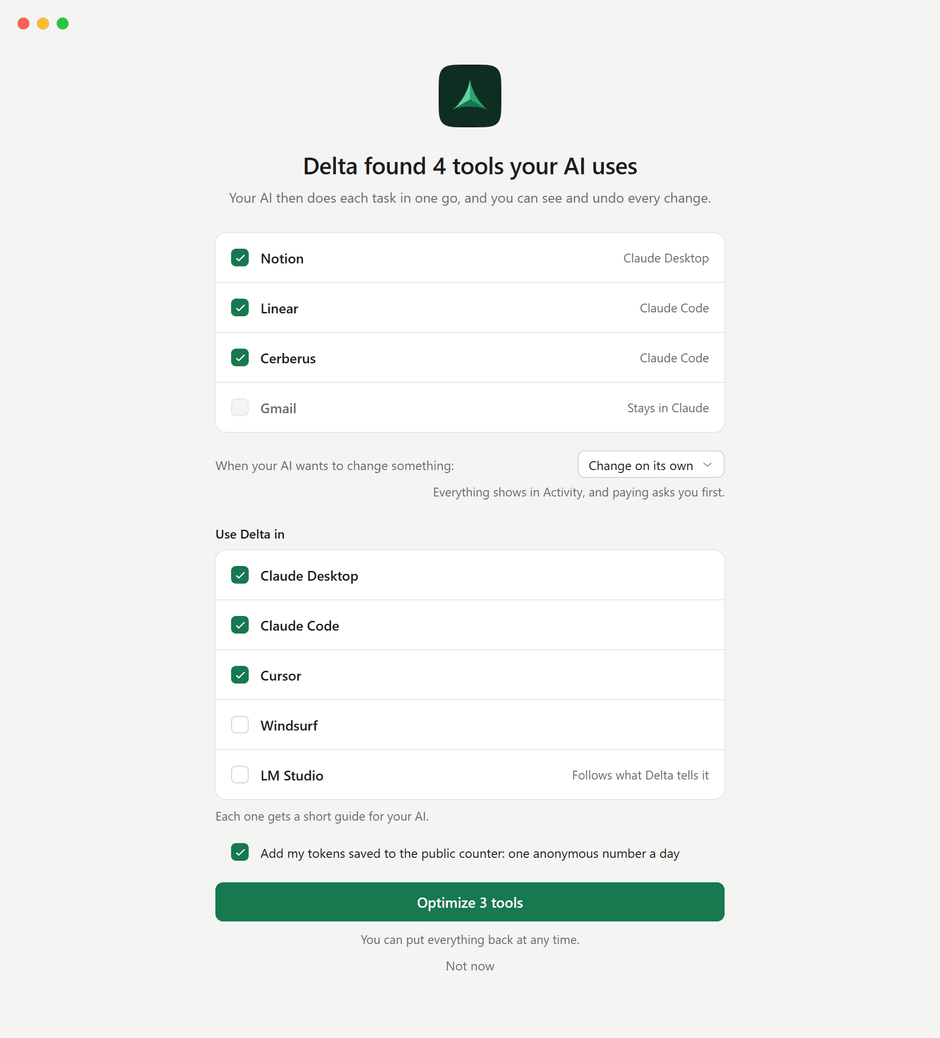
It finds the tools your AI uses
Its MCP servers, in Claude Desktop, Claude Code, Cursor, VS Code and 8 more apps, checked live. - 3
Click Optimize
Your AI uses them through Delta MCP from then on. Put everything back whenever you like.
Pricing
Free. Really.
Every feature, no account, no limit on servers. Nothing to unlock, ever.
- Every connector, as many as you like
- Each task in one go, all or nothing
- Activity, Undo and Do again
- Shortcuts, run again without AI
- Payments that ask you first
- No account, nothing about you sent without your yes
Like it? Support Delta MCP from $5 a month
Pricing
Free. Really.
- Every connector, no limit
- Activity, Undo and shortcuts
- No account
Questions about Delta MCP
What is Delta MCP?
Delta MCP is a free app that sits between your AI apps and their MCP servers. Your AI does each task as one program instead of one tool call per step. Delta MCP checks it before the first call, makes the fewest calls, all or nothing, reads the result back, records it and can undo it. It works with the MCP servers you already use.
Is Delta MCP really free?
Yes. Every feature is in the free app, with no account and no limit on servers. Supporters can help from $5 a month and get beta versions and a supporters’ Discord; everyone gets the same app.
Do I need to know how to code to use Delta MCP?
No. You ask your AI as usual; it writes the program, and Activity shows each change in plain words, with Undo.
Does Delta MCP save tokens?
Yes, on tasks with several steps: 3.3 to 24.1 times fewer tokens in our measurements. A single one-step question costs more (about 1.25 times the tokens), because your AI reads Delta MCP’s short description on every call.
Do I need to change my MCP servers?
No. Delta MCP uses them exactly as they are. Every original tool stays callable by name: 152 of 152 on the largest server we tried.
Does Delta MCP send my data anywhere?
No. Delta MCP runs on your computer and talks to your servers directly; your tools, tasks and history never leave it. Besides a check for new versions, which sends nothing about you, the only thing that can be sent is one anonymous number a day, your tokens saved: you choose at first launch, and it’s off in Settings in one click.
Is Delta MCP open source?
No. Delta MCP is a free app, and its source code is not public. How it works is written out in the docs, how it is measured is on the benchmarks page, and everything it does on your computer is recorded in Activity.
How do I stop using Delta MCP?
Settings, then Put everything back. Each connector returns to your AI apps exactly as it was; Delta MCP keeps a copy of every file it changed.
Which AI apps does Delta MCP work with?
Delta MCP works with 12 AI apps: Claude Desktop, Claude Code, Cursor, VS Code, Windsurf, Gemini CLI, Cline, Roo Code, LM Studio, Amazon Q, Codex and Zed. It switches the first ten over for you; Codex and Zed are set up by hand for now.
Do I still need Delta MCP if my AI app has Tool Search?
Yes, on tasks with several steps. Tool Search keeps the list of tools short, but every step is still a separate request to the model. Delta MCP removes those requests: your AI writes the task as one program. Our measurements were taken with Tool Search on, so the savings come on top of it.
Is Delta MCP an MCP gateway or proxy?
It is closer to a local proxy than to an enterprise gateway. Like a proxy, it puts your MCP servers behind one entry in your AI apps. Unlike a gateway, it is a free app on your own computer, with no service to run. Its main job is different: your AI writes each task as one program, so it makes far fewer calls.
Keep reading
-
How to reduce MCP token usage, and why MCP burns tokens
How to reduce MCP token usage: measure it with /context, see the two costs (tool menu and round trips), and compare every fix, Tool Search included.
-
MCP config file locations: Claude, Cursor, VS Code and more
Where Claude Desktop, Claude Code, Cursor, VS Code, Windsurf, Gemini CLI and Codex keep their MCP config: file path, JSON key, remote servers and tool limits.

Try Delta MCP on your own tasks
Free, two minutes to set up, and you can put everything back in one click.
Free · No account · Apple chip or Intel
Free · No account
Free · No account
For Mac, Windows and Linux. No account needed.