The short answer
Undo it in the tool where it happened, because each tool keeps its own history. In Notion, restore the page from Trash or Version history. In GitHub, revert the commit or restore the branch. For files, use Git, your AI app’s checkpoints or a backup. A message already sent is the hard one.
In this guide
How do you see what your AI changed?
Look before you undo, so you know exactly what to put back. Each tool keeps its own record of what changed.
Version historyin Notion. On the page, click ••• at the top, then Version history. Pick a version to see the highlights of what changed. Notion saves a version every 10 minutes while someone edits, and again two minutes after the last edit.git diffin a project under Git. It shows the edits you have not staged yet.git diff HEADcompares your files with the latest commit.git reflogrecords each time a branch tip was updated in your local repository. If your AI may have moved or reset a branch, look here for where it stood before. Entries last 90 days by default, or 30 days for commits the branch no longer reaches.
If your AI worked through Delta MCP, Activity already shows each change before and after. More on that below.
How do you undo it, tool by tool?
Each tool keeps its own history, so you undo in the tool where the change happened. Find your case.
| What happened | What to do | Limits | Official page |
|---|---|---|---|
| Notion: a page was edited | Open the page, click •••, choose Version history, open an earlier version and click Restore. To keep today’s page, copy only the blocks you need. | You need Can edit access. It goes back 7 days on Free, 30 on Plus, 90 on Business and any number on Enterprise. It shows the main highlights, not every change. A database restore brings back its pages and properties, not the text inside them. | Notion: Delete & restore content |
| Notion: a page or database was deleted | Open Trash in the sidebar, open the page and restore it. | Pages stay in Trash for 30 days by default. Notion’s own MCP server deletes by moving pages to Trash, up to 20 per call. | Notion: Delete & restore contentNotion: Supported tools (Notion MCP documentation) |
| GitHub: a pull request was merged | Open it and click Revert. GitHub creates a new pull request that reverts the merge commit. Merge that one. | You need write permission. With merge conflicts, revert the commits with git revert instead. | GitHub: Reverting a pull request |
| GitHub: commits were pushed, or a file was deleted | git revert HEAD records a new commit that undoes the latest one. Name another commit to undo that one instead. GitHub’s MCP file tools take a commit message, so their changes are commits too. | It needs a clean working tree. To revert a merge commit, add -m 1 to name the parent that stays as the mainline. Git then treats the merged changes as never wanted. A later merge brings in only commits that were not part of it. | Git: git-revert DocumentationGitHub: GitHub MCP Server (README on GitHub) |
| GitHub: a branch was deleted | Open the closed pull request that used the branch and click Restore branch. | It works for the head branch of a closed pull request. | GitHub: Deleting and restoring branches in a pull request |
| GitHub: a repository was deleted | Open Deleted repositories in the Settings of your account or organization, then click Restore. | Within 90 days, and not if it was part of a fork network that is not empty. It can take up to an hour after the deletion before you can restore it. Team permissions are not restored. | GitHub: Restoring a deleted repository |
| Files edited by Claude Code or Cursor | Claude Code: run /rewind or press Esc twice on an empty prompt, pick a prompt and choose Restore code. Cursor: click a checkpoint in the chat timeline and restore it. | Claude Code keeps snapshots for the last 100 checkpoints, and drops them about 30 days after the session’s last save. It does not track rm, mv or cp run through Bash. Cursor’s checkpoints revert files only. Both point to Git for permanent history. | Claude Code: Checkpointing (documentation)Cursor: Overview (Agent documentation) |
| Files in a Git project | git restore notes.md gets a deleted or changed file back from Git’s index. Add --source=HEAD to take it from your latest commit instead, or name another commit, branch or tag. | It restores from the index or a commit, so Git can only give back what you committed or staged. Restoring overwrites the file as it is now, so run git diff first to see what you would lose. | Git: git-restore DocumentationGit: git-diff Documentation |
| Files, with a backup | On a Mac, open a window for the item, then open Time Machine from Spotlight. Step back through your backups with the arrows, select the item and click Restore. | You need a Time Machine backup made before the change. | Apple: Restore items backed up with Time Machine on Mac |
What can’t be undone?
Some changes leave the tool where your AI made them, or outlast the time a tool gives you. No restore button reaches those.
-
A message already sent
Gmail’s Undo Send is a button you get right after you send from its browser or app. You choose 5, 10, 20 or 30 seconds in Settings. Once that time is over, the message is out.
-
A file removed by a shell command
Claude Code’s checkpoints do not track
rm,mvorcprun through Bash. Look in Git or in your backup. -
Anything past a time limit
Notion keeps pages in Trash for 30 days by default. Notion’s support says it can also restore a snapshot of your content from the past 30 days. GitHub restores a deleted repository within 90 days.
-
What the change set off elsewhere
A restore fixes the page or the code. It does not recall an email, a notification or anything else the change already triggered.
What does Delta MCP add?
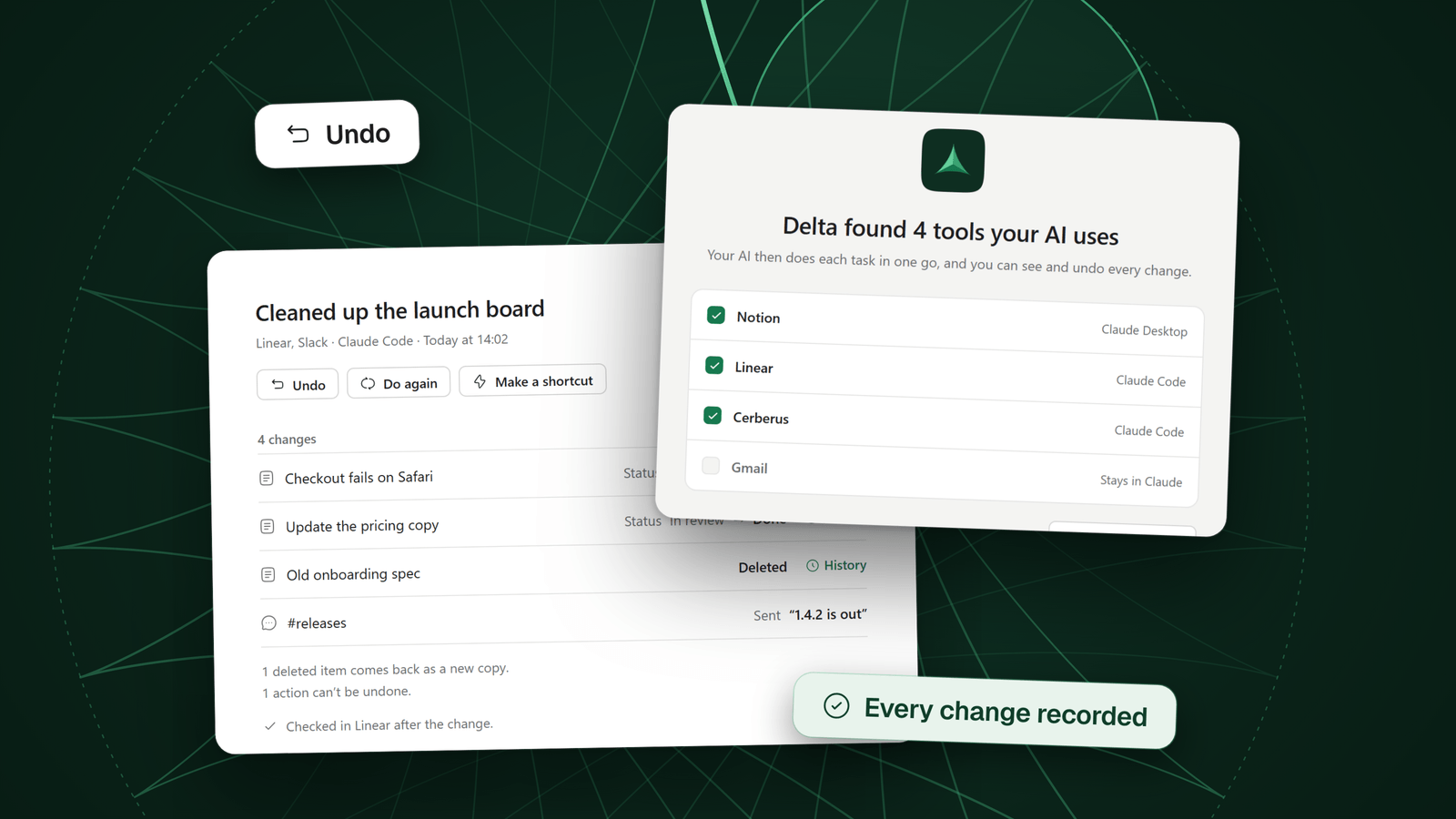
Delta MCP is a free app on your computer. It sits between your AI and your tools, such as Notion, GitHub, Linear, Vercel or your files. It records what your AI changes through it, task by task, with each change before and after.
Each task is one sentence in Activity, such as “Set status to Archive on 4 pages in Notion”. Delta MCP writes it from the changes themselves. Undo starts there.
- Pick the task in Activity
Search by sentence, connector, name or object. Open it to see each change, before and after. A change that Delta MCP read back and found in place is marked Checked.
- Click Undo and read the sheet
The sheet says what Undo will do before it does anything.
- Click Undo again
Delta MCP puts the changes back. Anything someone changed since is left as it is.
The sheet has up to three parts
- Comes back: what Undo puts back, including deleted items that return as new copies
- Changed since, left as is: what someone changed after your AI, which Undo does not touch
- Doesn’t come back: what can’t be undone, such as a message already sent
So you know, before you click, what comes back and what doesn’t. Some actions can’t be undone, such as a message already sent. Delta MCP tells you which, before you click and again after.
It can also stop the change first. In the modes that ask, a card opens before anything is made. It shows each change before and after, and what can be undone.
Activity and Undo, in the docs
How do you stop it happening again?
Give your AI less rope, and keep a copy it cannot reach. Each setting is small, and each lives in a different place.
- Start read onlyGitHub’s MCP server has a
--read-onlyflag that offers only read tools. Open up writing when the task needs it. - Ask before deletingNotion marks its delete tools as destructive (
destructiveHint). An MCP client can use that hint to ask before running one. Check whether your app does. - Commit before a long sessionCheckpoints in Claude Code and Cursor are for undoing your AI’s edits. Both point to Git for permanent history. Commit first, then let your AI work.
- Keep a backupA backup made before the change brings back a file that was never in Git.
- Pick a mode in Delta MCPFour modes, for each connector: change on its own, ask before deleting or sending, ask before every change, read only. You can set single actions apart. Delta MCP decides what counts as deleting or sending from the action’s name.
Setting access in each tool has its own guide. How to give an AI access to your tools safely
Questions
Can you undo what an AI agent did?
Yes, in the tool where it happened, if that tool kept a history and its time limit has not passed. Notion has Version history and Trash, GitHub has revert and restore, and Git or a backup covers files. A message already sent is the exception.
How do I undo a Notion page my AI deleted?
Open Trash in the sidebar, open the page and restore it. Pages stay in Trash for 30 days by default. Notion’s own MCP server deletes by moving pages to Trash, so the same restore applies.
How do I undo my AI’s changes in GitHub?
For a merged pull request, click Revert on it: GitHub opens a new pull request that reverts the merge. For commits, use git revert. For a deleted branch, open its closed pull request and click Restore branch. A revert needs write permission.
My AI deleted my files. Can I get them back?
Check Git first: git restore notes.md gets a deleted file back from Git’s index. Add --source=HEAD to take it from your latest commit. In Claude Code, /rewind restores edits made with its file tools, not files removed by rm in Bash. Otherwise use a backup such as Time Machine.
Can you unsend an email your AI sent?
In Gmail, only in the seconds after you send from its browser or app. Undo Send lets you cancel for 5, 10, 20 or 30 seconds, as you set in Settings. Treat a message your AI sent as sent.
Does Delta MCP undo what my AI did?
Yes, for tasks that went through it. Pick the task in Activity, click Undo and read the sheet, which says what will be put back. Some actions can’t be undone, such as a message already sent. Delta MCP tells you which, before you click and again after.
Sources
- Notion, Delete & restore content Version history (access, limits by plan, highlights, database restore), Trash and its 30 days, and Notion’s backups.
- Notion, Supported tools (Notion MCP documentation) Notion’s MCP delete tools move pages to Trash, are marked destructive, and a restore tool brings pages back.
- GitHub, Reverting a pull request The Revert button, the write permission and the merge-conflict case.
- GitHub, Deleting and restoring branches in a pull request Restoring the head branch of a closed pull request.
- GitHub, Restoring a deleted repository The 90-day window, fork networks, team permissions and who can restore.
- GitHub, GitHub MCP Server (README on GitHub) The tools that write, with a commit message, and the read-only flag.
- Git, git-revert Documentation git revert records new commits that undo earlier ones; reverting a merge with -m.
- Git, git-restore Documentation Restoring files from a commit, branch or tag with --source.
- Git, git-reflog Documentation The reflog records branch tip updates; the 90-day and 30-day defaults.
- Git, git-diff Documentation git diff and git diff HEAD.
- Claude Code, Checkpointing (documentation) /rewind, the 100 checkpoints and about 30 days, and Bash changes that are not tracked.
- Cursor, Overview (Agent documentation) Checkpoints before significant changes; restoring reverts files only; stored apart from Git.
- Google, Send or unsend Gmail messages (Gmail Help) Undo Send and its 5, 10, 20 or 30 second window.
- Apple, Restore items backed up with Time Machine on Mac The steps to restore an item from a Time Machine backup.
- Delta MCP, Activity and Undo Activity, the Undo sheet, and the warning about what can’t be undone.
- Delta MCP, Modes The four modes and the card that shows each change before and after.
Keep reading
- How to give an AI access to your tools safely (MCP)MCP permissions in plain words: four access levels, where to set them in Claude, Cursor, VS Code, GitHub and Notion, and how to start read-only.
- MCP tool call timed out? Check the write before retryingMCP tool call timed out? The change may still have happened. Check before you retry, see which calls are safe to repeat, and set the timeout.